Home technology
Inside our Chiang Mai home network
Our Apple TV plays films from the same two drives that hold our Mac backups. Follow the cables from the sofa to the office, where switching to Ethernet nearly quadrupled our read speed.
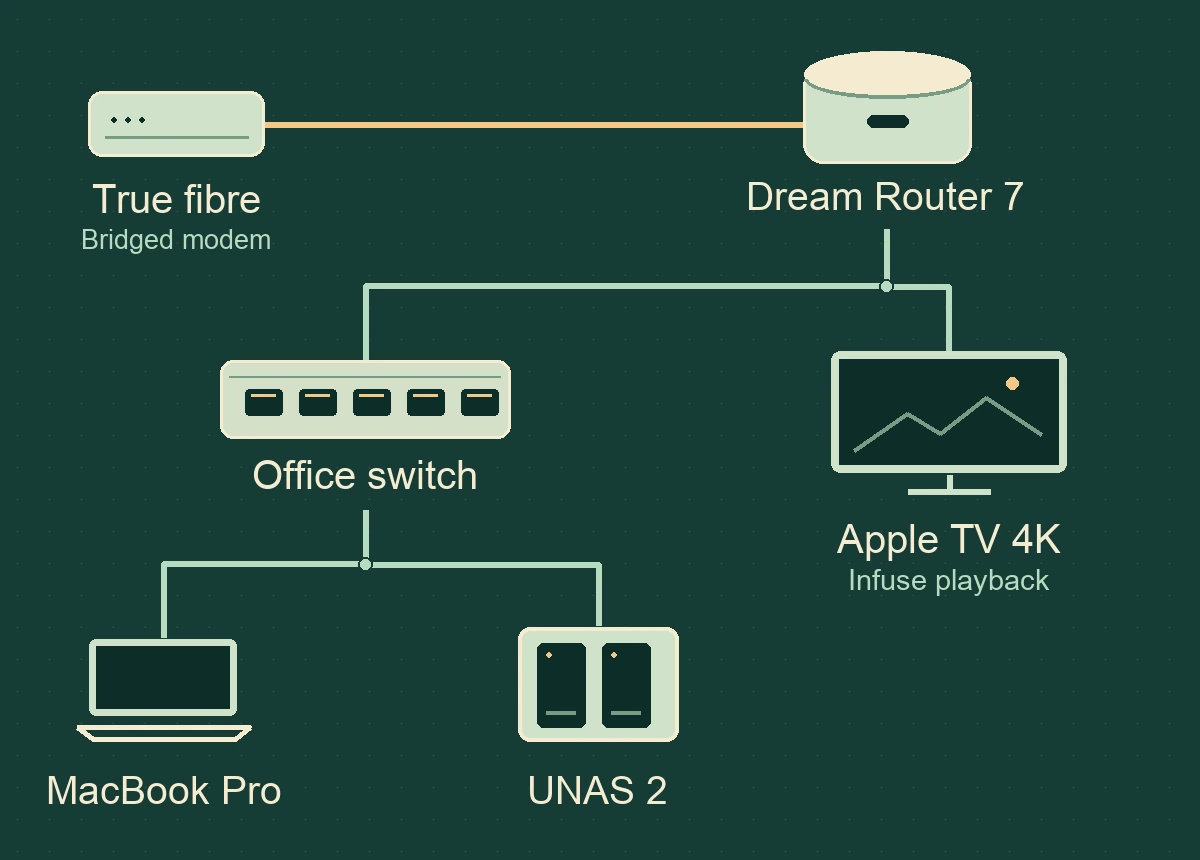
How a film gets from the office to the sofa
Choose a film in Infuse on the living-room Apple TV 4K and the file comes from a pair of hard drives in the office. The UniFi UNAS 2 holds the library and acts as our media server. It’s a network-attached storage (NAS) device, so the Mac and Apple TV can both reach the same files. Infuse browses it over SMB, the file-sharing protocol, and plays it on the Apple TV. A Samsung 65-inch S95D OLED and Q990D soundbar handle the picture and sound.
The Apple TV has its own Ethernet connection. Once the film is on the NAS, the video travels across the home network. Increasing the fibre subscription would do little for that journey. The useful decision for a new house is where to put the network outlet behind the TV.
For the steps I use to get from a shared folder to a film on screen, read how I stream from my NAS with Infuse on Apple TV.
What connects to what?
- Where the fibre comes in
- A True GPON fibre modem runs in bridge mode. The UniFi Dream Router 7 (UDR7) signs in to True using PPPoE and handles routing, the firewall and Wi-Fi 7. In February 2026 the household reported a 500 Mb/s download and upload package. A later discussion explored a 2 Gb/s download upgrade.
- At the office desk
- A Cat8 cable runs from the router to a five-port UniFi Flex Mini 2.5G switch (USW-Flex-2.5G-5). The M1 MacBook Pro plugs in through a UniFi 5 Gb Ethernet adapter. The office switch sets the link ceiling at 2.5 Gb/s. With the Mac and NAS on that switch, their file transfers can stay in the office.
- Inside the NAS
- The UNAS 2 holds two 26 TB Seagate Exos ST26000NM000C hard drives. That is 52 TB of raw drive capacity before redundancy and formatting. This is where the movie library and household backups share space.
- In the rack
- A GLINK GC9U 9U cabinet is 500 mm deep. A GLINK GPDU-08B supplies six rack outlets and a GCA-05 temperature-controlled fan provides airflow. Drive noise, cable clearance behind the equipment and the route for warm air all matter when choosing a spot for this cabinet.
What did the cable change?
In the office, Blackmagic Disk Speed Test read from the NAS at 62.8 MB/s over Wi-Fi. Taking the Mac to within roughly 10 cm of the router raised that to 71.6 MB/s. Plugging the Mac into Ethernet raised the read speed to 243.1 MB/s, about 3.9 times the office Wi-Fi result. Writes improved by about 2.4 times.
| Connection | Read (MB/s) | Write (MB/s) |
|---|---|---|
| Office Wi-Fi | 62.8 | 33.2 |
| Wi-Fi near the router | 71.6 | 47.0 |
| Wired Ethernet | 243.1 | 79.1 |
“Read” means copying data from the NAS to the Mac. “Write” means sending it back. Internet packages are quoted in megabits per second (Mb/s). These storage tests use megabytes per second (MB/s), with eight bits in a byte.
To put that into desk time, reading a 10 GB file at the two office rates would take about 2 minutes 39 seconds on Wi-Fi or 41 seconds on Ethernet. That is a calculation using decimal gigabytes and a constant transfer rate. Small files, caching and other work on the disks can change the result.
How long would your file transfer take?
Choose a file size and direction to compare the three connections in the March test. Each estimate uses 1,000 MB per GB and assumes the measured speed holds for the whole transfer.
Why a backup can look slow on a fast link
The Mac uses Time Machine with the UNAS as its backup destination. The household also uses UniFi Endpoint to back up phone photos. A June check found photo-backup files on the NAS while the phone still showed a backup in progress.
For both setups and a way to check what you can recover, read how I back up my Mac and iPhone photos to the UniFi NAS.
Two wired tests put those jobs in perspective. On 14 March 2026, a 10 GB terminal file test recorded 244.0 MB/s read and 206.4 MB/s write. On 15 November 2026, Blackmagic recorded 104.2 MB/s read and 140.5 MB/s write while Time Machine was running. During that backup the household had observed copying at around 2 MB/s.
Time Machine checks which files have changed and processes file metadata. A sequential speed test moves large blocks of data. Seeing the NAS accept writes at 140.5 MB/s during the backup showed why the backup display alone was a poor reason to replace the office switch.
Wi-Fi around the house
One feature to look for when shopping for Wi-Fi 7 equipment is MLO. It lets a compatible phone or laptop keep several wireless links to the same access point, which can help when one band is busy. Both ends need to support it. The office speed figures above compare Wi-Fi and Ethernet and don’t measure any gain from MLO.
The phones and iPad can move between rooms. HomeKit and AirPlay let the household find devices and send media across the network. The smart-home equipment includes an Aqara G3, an Aqara E1, a UniFi G6 Instant camera, two Yeelight bulbs and a Samsung air purifier. The household also uses a VPN on the Mac and mobile devices and wants local storage and device discovery to keep working alongside it.
The smart-home plan is to give connected appliances their own network and guests a separate one, while keeping access to HomeKit cameras convenient. The November review recorded this as work in progress. A UniFi AirWire was also on order. The speed figures above come from the existing setup.
What this changes on the house plan
Mark the desk and TV cabinet before the walls close. The desk is where hundreds of gigabytes might move in one sitting. The TV is where the household wants uninterrupted playback. Both have a reason for a cable, even in a home with Wi-Fi 7.
Use the room-by-room Ethernet socket plan to mark those outlets for the installer. If you are also choosing the service that will feed the house, the Thai home fibre guide compares the cost of two example contracts.
Plan the cupboard as carefully as the cable runs. Leave room to open the rack, reach the rear plugs and let heat escape. A rack UPS, more cameras with a dedicated recorder, additional Wi-Fi access points and a possible 10 Gb/s backbone are future options. The measured 2.5 Gb/s setup is the baseline for deciding which upgrade earns its space.
To estimate how much drive space those cameras would use, enter the recording hours and bitrate in the security camera storage calculator.
For the wider running-cost picture, see the household electricity and water bills.
Household equipment inventory, March 2026 Blackmagic Disk Speed Test readings, a 14 March terminal file test, and the 15 November 2026 Time Machine and network review. The media and backup sections also draw on the household’s Apple TV, Infuse and UniFi Endpoint notes. For the player’s supported connections, see Firecore’s guide to streaming from a NAS.